Best Industrial Training in C,C++,PHP,Dot Net,Java in Jalandhar

Sunday, 22 March 2015

Introduction to Object Oriented Programming Concepts in C#


Introduction to Object Oriented Programming Concepts in C#

Introduction to Object Oriented Programming (OOP) concepts in C#: Abstraction, Encapsulation, Inheritance and Polymorphism.
OOP Features
Object Oriented Programming (OOP) is a programming model where programs are organized around objects and data rather than action and logic.

OOP allows decomposition of a problem into a number of entities called objects and then builds data and functions around these objects.

  1. The software is divided into a number of small units called objects. The data and functions are built around these objects.
  2. The data of the objects can be accessed only by the functions associated with that object.
  3. The functions of one object can access the functions of another object.
OOP has the following important features.

 Class

A class is the core of any modern Object Oriented Programming language such as C#.
In OOP languages it is mandatory to create a class for representing data. 
A class is a blueprint of an object that contains variables for storing data and functions to perform operations on the data. 
A class will not occupy any memory space and hence it is only a logical representation of data.
To create a class, you simply use the keyword "class" followed by the class name:
class Employee
{

}

Object
Objects are the basic run-time entities of an object oriented system. They may represent a person, a place or any item that the program must handle.

"An object is a software bundle of related variable and methods."

"An object is an instance of a class"

oops-in-csharp.jpg 
A class will not occupy any memory space. Hence to work with the data represented by the class you must create a variable for the class, that is called an object. 
When an object is created using the new operator, memory is allocated for the class in the heap, the object is called an instance and its starting address will be stored in the object in stack memory.
When an object is created without the new operator, memory will not be allocated in the heap, in other words an instance will not be created and the object in the stack contains the value null.
When an object contains null, then it is not possible to access the members of the class using that object.

class Employee
{

}

Syntax to create an object of class Employee:

Employee objEmp = new Employee();

All the programming languages supporting Object Oriented Programming will be supporting these three main concepts:

  1. Encapsulation
  2. Inheritance
  3. Polymorphism
Abstraction
Abstraction is "To represent the essential feature without representing the background details."

Abstraction lets you focus on what the object does instead of how it does it.

Abstraction provides you a generalized view of your classes or objects by providing relevant information.

Abstraction is the process of hiding the working style of an object, and showing the information of an object in an understandable manner.

Real-world Example of Abstraction

Suppose you have an object Mobile Phone.

Suppose you have 3 mobile phones as in the following:

Nokia 1400 (Features: Calling, SMS)
Nokia 2700 (Features: Calling, SMS, FM Radio, MP3, Camera)
Black Berry (Features:Calling, SMS, FM Radio, MP3, Camera, Video Recording, Reading E-mails)

Abstract information (necessary and common information) for the object "Mobile Phone" is that it makes a call to any number and can send SMS.

So that, for a mobile phone object you will have the abstract class as in the following:

   abstract class MobilePhone
    {
        public void Calling();
        public void SendSMS();
    }

    public class Nokia1400 : MobilePhone
    {
    }

    public class Nokia2700 : MobilePhone
    {
        public void FMRadio();
        public void MP3();
        public void Camera();
    }

    public class BlackBerry : MobilePhone
    {
        public void FMRadio();
        public void MP3();
        public void Camera();
        public void Recording();
        public void ReadAndSendEmails();
    }

Abstraction means putting all the variables and methods in a class that are necessary.
For example: Abstract class and abstract method.
Abstraction is a common thing.
Example
If somebody in your collage tells you to fill in an application form, you will provide your details, like name, address, date of birth, which semester, percentage you have etcetera.
If some doctor gives you an application to fill in the details, you will provide the details, like name, address, date of birth, blood group, height and weight.
See in the preceding example what is in common?
Age, name and address, so you can create a class that consists of the common data. That is called an abstract class. 
That class is not complete and it can be inherited by other classes.

Encapsulation

Wrapping up a data member and a method together into a single unit (in other words class) is called Encapsulation.

Encapsulation is like enclosing in a capsule. That is enclosing the related operations and data related to an object into that object.

Encapsulation is like your bag in which you can keep your pen, book etcetera. It means this is the property of encapsulating members and functions.

    class Bag
    {
        book;
        pen;
        ReadBook();
    }

Encapsulation means hiding the internal details of an object, in other words how an object does something.

Encapsulation prevents clients from seeing its inside view, where the behaviour of the abstraction is implemented.

Encapsulation is a technique used to protect the information in an object from another object.

Hide the data for security such as making the variables private, and expose the property to access the private data that will be public.

So, when you access the property you can validate the data and set it.

Example 1

    class Demo
    {
        private int _mark;

        public int Mark
        {
            get { return _mark; }
            set { if (_mark > 0) _mark = value; else _mark = 0; }
        }
    }

Real-world Example of Encapsulation
Let's use as an example Mobile Phones and Mobile Phone Manufacturers.
Suppose you are a Mobile Phone Manufacturer and you have designed and developed a Mobile Phone design (a class). Now by using machinery you are manufacturing Mobile Phones (objects) for selling, when you sell your Mobile Phone the user only learns how to use the Mobile Phone but not how the Mobile Phone works.

This means that you are creating the class with functions and by with objects (capsules) of which you are making available the functionality of your class by that object and without the interference in the original class.

Example 2

TV operation 
It is encapsulated with a cover and we can operate it with a remote and there is no need to open the TV to change the channel.
Here everything is private except the remote, so that anyone can access the remote to operate and change the things in the TV.

Inheritance

When a class includes a property of another class it is known as inheritance.
Inheritance is a process of object reusability.
For example, a child includes  the properties of its parents.
    public class ParentClass
    {
        public ParentClass()
        {
            Console.WriteLine("Parent Constructor.");
        }

        public void print()
        {
            Console.WriteLine("I'm a Parent Class.");
        }
    }

    public class ChildClass : ParentClass
    {
        public ChildClass()
        {
            Console.WriteLine("Child Constructor.");
        }

        public static void Main()
        {
            ChildClass child = new ChildClass();

            child.print();
        }
    }

Output
    Parent Constructor.
    Child Constructor.
    I'm a Parent Class.

Polymorphism

Polymorphism means one name, many forms.
One function behaves in different forms.
In other words, "Many forms of a single object is called Polymorphism."

Real-world Example of Polymorphism

Example 1
A teacher behaves students.
A teacher behaves his/her seniors.
Here teacher is an object but the attitude is different in different situations.
Example 2
A person behaves the son in a house at the same time that the person behaves an employee in an office.
Example 3
Your mobile phone, one name but many forms:
  • As phone
  • As camera
  • As mp3 player
  • As radio
To read about Polmorphism in detail click the following link:

Polymorphism in .Net

The Differences between Abstraction and Encapsulation

AbstractionEncapsulation
1.  Abstraction solves the problem at the design level.1. Encapsulation solves the problem in the implementation level.
2. Abstraction hides unwanted data and provides relevant data.2. Encapsulation means hiding the code and data into a single unit to protect the data from the outside world.
3. Abstraction lets you focus on what the object does instead of how it does it3. Encapsulation means hiding the internal details or mechanics of how an object does something.
4. Abstraction: Outer layout, used in terms of design.
For example:
An external of a Mobile Phone, like it has a display screen and keypad buttons to dial a number.
 
4. Encapsulation- Inner layout, used in terms of implementation.
For example: the internal details of a Mobile Phone, how the keypad button and display screen are connected with each other using circuits.
 
 The easier way to understand abstraction and encapsulation is as follows.
Real-world Example
Use an example of a Mobile Phone
You have a Mobile Phone, you can dial a number using keypad buttons. You don't even know how these are working internally. This is called Abstraction. You only have the information that is necessary to dial a number. But not internal working of the mobile.

But how does the Mobile Phone work internally? How are the keypad buttons connected with internal circuit? That is called Encapsulation.

Summary
"Encapsulation is accomplished using classes. Keeping data and methods that access that data into a single unit." 
"Abstraction is accomplished using an Interface. Just giving the abstract information about what it can do without specifying the details."
"Information/Data hiding is accomplished using modifiers by keeping the instance variables private or protected."

Wednesday, 25 February 2015

ADO Display

The most common way to display data from a recordset, is to display the data in an HTML table. 

Display the Field Names and Field Values

We have a database named "Northwind" and we want to display the data from the "Customers" table (remember to save the file with an .asp extension):

Example

<html>
<body>

<%
set conn=Server.CreateObject("ADODB.Connection")
conn.Provider="Microsoft.Jet.OLEDB.4.0"
conn.Open "c:/webdata/northwind.mdb"

set rs = Server.CreateObject("ADODB.recordset")
rs.Open "SELECT * FROM Customers", conn

do until rs.EOF
  for each x in rs.Fields
    Response.Write(x.name)
    Response.Write(" = ")
    Response.Write(x.value & "<br>")
  next
  Response.Write("<br>")
  rs.MoveNext
loop

rs.close
conn.close
%>

</body>
</html>


Display the Field Names and Field Values in an HTML Table

We can also display the data from the "Customers" table inside an HTML table with the following lines (remember to save the file with an .asp extension):

Example

<html>
<body>

<%
set conn=Server.CreateObject("ADODB.Connection")
conn.Provider="Microsoft.Jet.OLEDB.4.0"
conn.Open "c:/webdata/northwind.mdb"

set rs = Server.CreateObject("ADODB.recordset")
rs.Open "SELECT Companyname, Contactname FROM Customers", conn
%>

<table border="1" width="100%">
<%do until rs.EOF%>
  <tr>
  <%for each x in rs.Fields%>
    <td><%Response.Write(x.value)%></td>
  <%next
  rs.MoveNext%>
  </tr>
<%loop
rs.close
conn.close
%>
</table>

</body>
</html>


Add Headers to the HTML Table

We want to add headers to the HTML table to make it more readable (remember to save the file with an .asp extension):

Example

<html>
<body>

<%
set conn=Server.CreateObject("ADODB.Connection")
conn.Provider="Microsoft.Jet.OLEDB.4.0"
conn.Open "c:/webdata/northwind.mdb"

set rs = Server.CreateObject("ADODB.recordset")
sql="SELECT Companyname, Contactname FROM Customers"
rs.Open sql, conn
%>

<table border="1" width="100%">
  <tr>
  <%for each x in rs.Fields
    response.write("<th>" & x.name & "</th>")
  next%>
  </tr>
  <%do until rs.EOF%>
    <tr>
    <%for each x in rs.Fields%>
      <td><%Response.Write(x.value)%></td>
    <%next
    rs.MoveNext%>
    </tr>
  <%loop
  rs.close
  conn.close
  %>
</table>

</body>
</html>

ADO Recordset

To be able to read database data, the data must first be loaded into a recordset. 

Create an ADO Table Recordset

After an ADO Database Connection has been created, as demonstrated in the previous chapter, it is possible to create an ADO Recordset.  
Suppose we have a database named "Northwind", we can get access to the "Customers" table inside the database with the following lines:
<%
set conn=Server.CreateObject("ADODB.Connection")
conn.Provider="Microsoft.Jet.OLEDB.4.0"
conn.Open "c:/webdata/northwind.mdb"

set rs=Server.CreateObject("ADODB.recordset")
rs.Open "Customers", conn
%>

Create an ADO SQL Recordset

We can also get access to the data in the "Customers" table using SQL:
<%
set conn=Server.CreateObject("ADODB.Connection")
conn.Provider="Microsoft.Jet.OLEDB.4.0"
conn.Open "c:/webdata/northwind.mdb"

set rs=Server.CreateObject("ADODB.recordset")
rs.Open "Select * from Customers", conn
%>

Extract Data from the Recordset

After a recordset is opened, we can extract data from recordset.  
Suppose we have a database named "Northwind", we can get access to the "Customers" table inside the database with the following lines:
<%
set conn=Server.CreateObject("ADODB.Connection")
conn.Provider="Microsoft.Jet.OLEDB.4.0"
conn.Open "c:/webdata/northwind.mdb"

set rs=Server.CreateObject("ADODB.recordset")
rs.Open "Select * from Customers", conn

for each x in rs.fields
  response.write(x.name)
  response.write(" = ")
  response.write(x.value)
next
%>

The ADO Recordset Object

The ADO Recordset object is used to hold a set of records from a database table. 

Introduction to ADO

What is ADO?

  • ADO is a Microsoft technology
  • ADO stands for ActiveX Data Objects
  • ADO is a Microsoft Active-X component
  • ADO is automatically installed with Microsoft IIS
  • ADO is a programming interface to access data in a database

Accessing a Database from an ASP Page

The common way to access a database from inside an ASP page is to:
  1. Create an ADO connection to a database
  2. Open the database connection
  3. Create an ADO recordset
  4. Open the recordset
  5. Extract the data you need from the recordset
  6. Close the recordset
  7. Close the connection
Before a database can be accessed from a web page, a database connection has to be established.

Create a DSN-less Database Connection

The easiest way to connect to a database is to use a DSN-less connection. A DSN-less connection can be used against any Microsoft Access database on your web site.
If you have a database called "northwind.mdb" located in a web directory like "c:/webdata/", you can connect to the database with the following ASP code:
<%
set conn=Server.CreateObject("ADODB.Connection")
conn.Provider="Microsoft.Jet.OLEDB.4.0"
conn.Open "c:/webdata/northwind.mdb"
%>
Note, from the example above, that you have to specify the Microsoft Access database driver (Provider) and the physical path to the database on your computer.

Create an ODBC Database Connection

If you have an ODBC database called "northwind" you can connect to the database with the following ASP code:
<%
set conn=Server.CreateObject("ADODB.Connection")
conn.Open "northwind"
%>
With an ODBC connection, you can connect to any database, on any computer in your network, as long as an ODBC connection is available.

An ODBC Connection to an MS Access Database

Here is how to create a connection to a MS Access Database: 
  1. Open the ODBC icon in your Control Panel.
  2. Choose the System DSN tab.
  3. Click on Add in the System DSN tab.
  4. Select the Microsoft Access Driver. Click Finish.
  5. In the next screen, click Select to locate the database.
  6. Give the database a Data Source Name (DSN).
  7. Click OK.
Note that this configuration has to be done on the computer where your web site is located. If you are running Personal Web Server (PWS) or Internet Information Server (IIS) on your own computer, the instructions above will work, but if your web site is located on a remote server, you have to have physical access to that server, or ask your web host to do this for you. 

Saturday, 24 January 2015

DBMS Architecture??


The design of a Database Management System highly depends on its architecture. It can be centralized or decentralized or hierarchical. DBMS architecture can be seen as single tier or multi tier. n-tier architecture divides the whole system into related but independent n modules, which can be independently modified, altered, changed or replaced.
In 1-tier architecture, DBMS is the only entity where user directly sits on DBMS and uses it. Any changes done here will directly be done on DBMS itself. It does not provide handy tools for end users and preferably database designer and programmers use single tier architecture.
If the architecture of DBMS is 2-tier then must have some application, which uses the DBMS. Programmers use 2-tier architecture where they access DBMS by means of application. Here application tier is entirely independent of database in term of operation, design and programming.


3-tier architecture

Most widely used architecture is 3-tier architecture. 3-tier architecture separates it tier from each other on basis of users. It is described as follows:
[Image: 3-tier DBMS architecture]
  • Database (Data) Tier: At this tier, only database resides. Database along with its query processing languages sits in layer-3 of 3-tier architecture. It also contains all relations and their constraints.
  • Application (Middle) Tier: At this tier the application server and program, which access database, resides. For a user this application tier works as abstracted view of database. Users are unaware of any existence of database beyond application. For database-tier, application tier is the user of it. Database tier is not aware of any other user beyond application tier. This tier works as mediator between the two.
  • User (Presentation) Tier: An end user sits on this tier. From a users aspect this tier is everything. He/she doesn't know about any existence or form of database beyond this layer. At this layer multiple views of database can be provided by the application. All views are generated by applications, which resides in application tier.
Multiple tier database architecture is highly modifiable as almost all its components are independent and can be changed independently.

What is DataBase?

Database is collection of data which is related by some aspect. Data is collection of facts and figures which can be processed to produce information. Name of a student, age, class and her subjects can be counted as data for recording purposes.
Mostly data represents recordable facts. Data aids in producing information which is based on facts. For example, if we have data about marks obtained by all students, we can then conclude about toppers and average marks etc.
A database management system stores data, in such a way which is easier to retrieve, manipulate and helps to produce information.

Characteristics

Traditionally data was organized in file formats. DBMS was all new concepts then and all the research was done to make it to overcome all the deficiencies in traditional style of data management. Modern DBMS has the following characteristics:
  • Real-world entity: Modern DBMS are more realistic and uses real world entities to design its architecture. It uses the behavior and attributes too. For example, a school database may use student as entity and their age as their attribute.
  • Relation-based tables: DBMS allows entities and relations among them to form as tables. This eases the concept of data saving. A user can understand the architecture of database just by looking at table names etc.
  • Isolation of data and application: A database system is entirely different than its data. Where database is said to active entity, data is said to be passive one on which the database works and organizes. DBMS also stores metadata which is data about data, to ease its own process.
  • Less redundancy: DBMS follows rules of normalization, which splits a relation when any of its attributes is having redundancy in values. Following normalization, which itself is a mathematically rich and scientific process, make the entire database to contain as less redundancy as possible.
  • Consistency: DBMS always enjoy the state on consistency where the previous form of data storing applications like file processing does not guarantee this. Consistency is a state where every relation in database remains consistent. There exist methods and techniques, which can detect attempt of leaving database in inconsistent state.
  • Query Language: DBMS is equipped with query language, which makes it more efficient to retrieve and manipulate data. A user can apply as many and different filtering options, as he or she wants. Traditionally it was not possible where file-processing system was used.
  • ACID Properties: DBMS follows the concepts for ACID properties, which stands for Atomicity, Consistency, Isolation and Durability. These concepts are applied on transactions, which manipulate data in database. ACID properties maintains database in healthy state in multi-transactional environment and in case of failure.
  • Multiuser and Concurrent Access: DBMS support multi-user environment and allows them to access and manipulate data in parallel. Though there are restrictions on transactions when they attempt to handle same data item, but users are always unaware of them.
  • Multiple views: DBMS offers multiples views for different users. A user who is in sales department will have a different view of database than a person working in production department. This enables user to have a concentrate view of database according to their requirements.
  • Security: Features like multiple views offers security at some extent where users are unable to access data of other users and departments. DBMS offers methods to impose constraints while entering data into database and retrieving data at later stage. DBMS offers many different levels of security features, which enables multiple users to have different view with different features. For example, a user in sales department cannot see data of purchase department is one thing, additionally how much data of sales department he can see, can also be managed. Because DBMS is not saved on disk as traditional file system it is very hard for a thief to break the code.

Users

DBMS is used by various users for various purposes. Some may involve in retrieving data and some may involve in backing it up. Some of them are described as follows:
[Image: DBMS Users]
  • Administrators: A bunch of users maintain the DBMS and are responsible for administrating the database. They are responsible to look after its usage and by whom it should be used. They create users access and apply limitation to maintain isolation and force security. Administrators also look after DBMS resources like system license, software application and tools required and other hardware related maintenance.
  • Designer: This is the group of people who actually works on designing part of database. The actual database is started with requirement analysis followed by a good designing process. They people keep a close watch on what data should be kept and in what format. They identify and design the whole set of entities, relations, constraints and views.
  • End Users: This group contains the persons who actually take advantage of database system. End users can be just viewers who pay attention to the logs or market rates or end users can be as sophisticated as business analysts who takes the most of it.

What is Data,Information?Diffrence Between them?What is File Processing system?

Data

Data is/are the facts of the World. For example, take yourself. You may be 5ft tall, have brown hair and blue eyes. All of this is “data”. You have brown hair whether this is written down somewhere or not.
In many ways, data can be thought of as a description of the World. We can perceive this data with our senses, and then the brain can process this.
Human beings have used data as long as we’ve existed to form knowledge of the world.

Information

Information allows us to expand our knowledge beyond the range of our senses. We can capture data in information, then move it about so that other people can access it at different times.
Here is a simple analogy for you.
If I take a picture of you, the photograph is information. But what you look like is data.
I can move the photo of you around, send it to other people via e-mail etc. However, I’m not actually moving you around – or what you look like. I’m simply allowing other people who can’t directly see you from where they are to know what you look like. If I lose or destroy the photo, this doesn’t change how you look.
So, in the case of the lost tax records, the CDs were information. The information was lost, but the data wasn’t. Mrs Jones still lives at 14 Whitewater road, and she was still born on 15th August 1971.

Some differences between data and information:
  • Data is used as input for the computer system. Information is the output of data.
  • Data is unprocessed facts figures. Information is processed data.
  • Data doesn’t depend on Information. Information depends on data.
  • Data is not specific. Information is specific.
  • Data is a single unit. A group of data which carries news and meaning is called Information.
  • Data doesn’t carry a meaning. Information must carry a logical meaning.
  • Data is the raw material. Information is the product.

Traditional File Processing System


File processing systems was an early attempt to computerize the manual filing system that we are all familiar with. A file system is a method for storing and organizing computer files and the data they contain to make it easy to find and access them. File systems may use a storage device such as a hard disk or CD-ROM and involve maintaining the physical location of the files.

In our own home, we probably have some sort of filing system, which contains receipts, guarantees, invoices, bank statements, and such like. When we need to look something up, we go to the filing system and search through the system starting from the first entry until we find what we want. Alternatively, we may have an indexing system that helps to locate what we want more quickly. For example we may have divisions in the filing system or separate folders for different types of item that are in some way logically related.

The manual filing system works well when the number of items to be stored is small. It even works quite adequately when there are large numbers of items and we have only to store and retrieve them. However, the manual filing system breaks down when we have to cross-reference or process the information in the files. For example, a typical real estate agent's office might have a separate file for each property for sale or rent, each potential buyer and renter, and each member of staff.

Clearly the manual system is inadequate for this' type of work. The file based system was developed in response to the needs of industry for more efficient data access. In early processing systems, an organization's information was stored as groups of records in separate files.

In the traditional approach, we used to store information in flat files which are maintained by the file system under the operating system's control. Here, flat files are files containing records having no structured relationship among them. The file handling which we learn under C/C ++ is the example of file processing system.


Characteristics of File Processing System

Here is the list of some important characteristics of file processing system:
• It is a group of files storing data of an organization.
• Each file is independent from one another.
• Each file is called a flat file.
• Each file contained and processed information for one specific function, such as accounting or inventory.
• Files are designed by using programs written in programming languages such as COBOL, C, C++.
• The physical implementation and access procedures are written into database application; therefore, physical changes resulted in intensive rework on the part of the programmer.
• As systems became more complex, file processing systems offered little flexibility, presented many limitations, and were difficult to maintain.

Limitations of the File Processing System I File-Based Approach

There are following problems associated with the File Based Approach:
 
1. Separated and Isolated Data: To make a decision, a user might need data from two separate files. First, the files were evaluated by analysts and programmers to determine the specific data required from each file and the relationships between the data and then applications could be written in a programming language to process and extract the needed data. Imagine the work involved if data from several files was needed.
2. Duplication of data: Often the same information is stored in more than one file. Uncontrolled duplication of data is not required for several reasons, such as:
• Duplication is wasteful. It costs time and money to enter the data more than once
• It takes up additional storage space, again with associated costs.
• Duplication can lead to loss of data integrity; in other words the data is no longer consistent. For example, consider the duplication of data between the Payroll and Personnel departments. If a member of staff moves to new house and the change of address is communicated only to Personnel and not to Payroll, the person's pay slip will be sent to the wrong address. A more serious problem occurs if an employee is promoted with an associated increase in salary. Again, the change is notified to Personnel but the change does not filter through to Payroll. Now, the employee is receiving the wrong salary. When this error is detected, it will take time and effort to resolve. Both these examples, illustrate inconsistencies that may result from the duplication of data. As there is no automatic way for Personnel to update the data in the Payroll files, it is difficult to foresee such inconsistencies arising. Even if Payroll is notified of the changes, it is possible that the data will be entered incorrectly.
3. Data Dependence: In file processing systems, files and records were described by specific physical formats that were coded into the application program by programmers. If the format of a certain record was changed, the code in each file containing that format must be updated. Furthermore, instructions for data storage and access were written into the application's code. Therefore, .changes in storage structure or access methods could greatly affect the processing or results of an application.
In other words, in file based approach application programs are data dependent. It means that, with the change in the physical representation (how the data is physically represented in disk) or access technique (how it is physically accessed) of data, application programs are also affected and needs modification. In other words application programs are dependent on the how the data is physically stored and accessed.
If for example, if the physical format of the master/transaction file is changed, by making he modification in the delimiter of the field or record, it necessitates that the application programs which depend on it must be modified.
Let us consider a student file, where information of students is stored in text file and each field is separated by blank space as shown below:
I Rahat 35 Thapar
Now, if the delimiter of the field changes from blank space to semicolon as shown below:
1; Rahat; 35; Thapar
Then, the application programs using this file must be modified, because now it will token the field on semicolon; but earlier it was blank space.
4. Difficulty in representing data from the user's view: To create useful applications for the user, often data from various files must be combined. In file processing it was difficult to determine relationships between isolated data in order to meet user requirements.
5. Data Inflexibility: Program-data interdependency and data isolation, limited the flexibility of file processing systems in providing users with ad-hoc information requests
6. Incompatible file formats: As the structure of files is embedded in the application programs, the structures are dependent on the application programming language. For example, the structure of a file generated by a COBOL program may be different from the structure of a file generated by a 'C' program. The direct incompatibility of such files makes them difficult to process jointly.
7. Data Security. The security of data is low in file based system because, the data is maintained in the flat file(s) is easily accessible. For Example: Consider the Banking System. The Customer Transaction file has details about the total available balance of all customers. A Customer wants information about his account balance. In a file system it is difficult to give the Customer access to only his data in the· file. Thus enforcing security constraints for the entire file or for certain data items are difficult.
8. Transactional Problems. The File based system approach does not satisfy transaction properties like Atomicity, Consistency, Isolation and Durability properties commonly known as ACID properties.
For example: Suppose, in a banking system, a transaction that transfers Rs. 1000 from account A to account B with initial values' of A and B being Rs. 5000 and Rs. 10000 respectively. If a system crash occurred after the withdrawal of Rs. 1000 from account A, but before depositing of amount in account B, it will result an inconsistent state of the system. It means that the transactions should not execute partially but wholly. This concept is known as Atomicity of a transaction (either 0% or 100% of transaction). It is difficult to achieve this property in a file based system.
9. Concurrency problems. When multiple users access the same piece of data at same interval of time then it is called as concurrency of the system. When two or more users read the data simultaneously there is ll( problem, but when they like to update a file simultaneously, it may result in a problem.

10. Poor data modeling of real world. The file based system is not able to represent the complex data and interfile relationships, which results poor data modeling properties.

Case Study
 
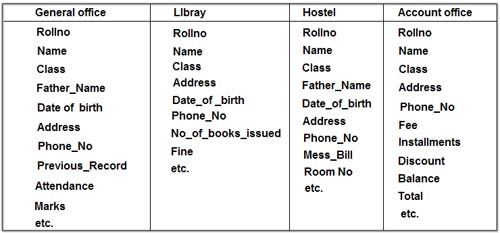
In case of college database, there may be the number of applications like General Office, Library, Account Office, Hostel etc. Each of these applications may maintain the following information into own private file applications in case of file management system:
                          In case of college database, there may be the number of applications like General Office, Library, Account Office, Hostel etc
It is clear from the above file systems, that there are some common data items of the student which has to be mentioned in each application, like Rollno, Name, Class, Father_Name, Address, Phone_No, Date_of_birth etc. which are stored repeatedly in file system in each application. It will cause the problem of redundancy which results in wastage of storage space and difficulty in maintenance. So, we should look for a solution to these types of redundancies. The database approach discussed below will help us to provide the solution for above problems.